The context
This project starts with a Google Sheets file used as a CRM. Tasks were spread across several people, with due dates typed into a column. To see what was coming, someone had to open the file and read through the rows. The owners already worked in their calendars, but spreadsheet deadlines never appeared there.
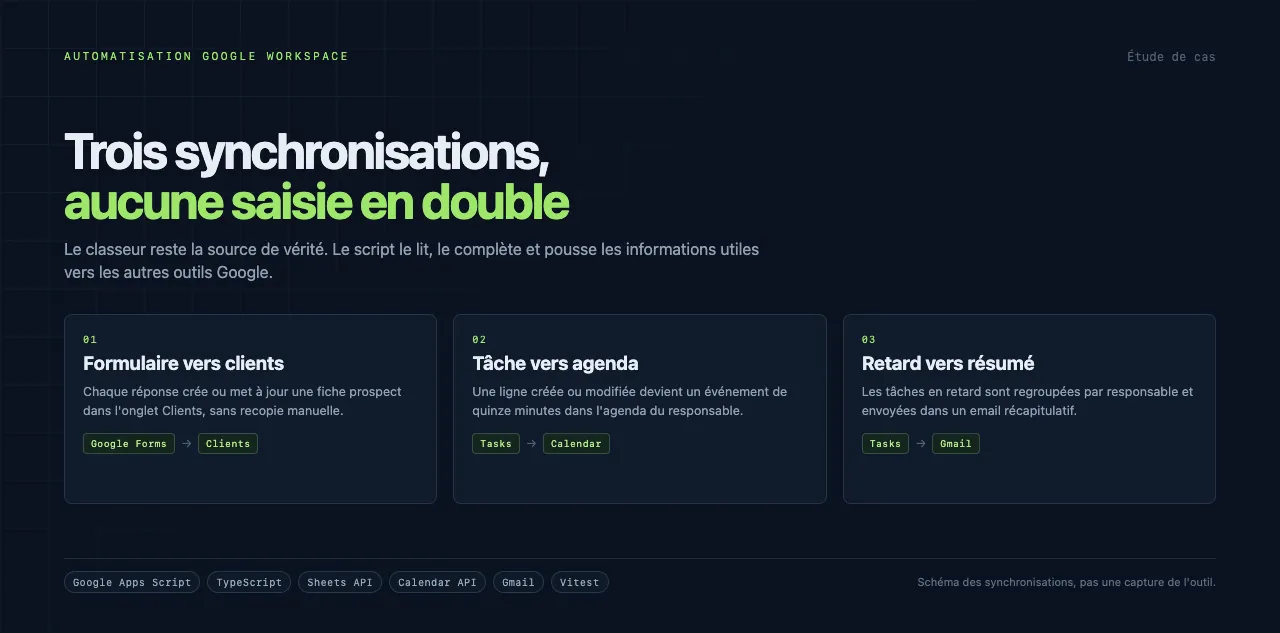
The goal was to keep the spreadsheet as the source of truth while making each task show up at the right time in its owner's calendar. The client chose to stay anonymous. The visuals in this case study are diagrams of the system, with no tool screenshot and no organisation name.
What the script syncs
The script reads form responses to create prospect records in the Clients tab. It also reacts to edits in the workbook. When a task row is created or changed, it checks the fields, finds the owner and creates or updates an event in that person's Google Calendar.
The event lasts fifteen minutes and sits just before the deadline. If the slot is busy, the script moves back in time until it finds the first free moment, without going past the task time. The event title and colour reflect the task status, and the event links back to the spreadsheet row.
Overdue tasks are grouped by owner and sent in a summary email through Gmail. A maintenance menu lets an administrator resync pending tasks.
The overdue summary goes out on a regular interval. It does not replace calendar notifications, but it gives the owner an overview. A forgotten task stays visible even if its event was moved or deleted.
The script keeps very little state of its own. The spreadsheet holds the tasks, Calendar holds the events and Gmail carries the summaries. That makes the system easier to inspect: if something looks wrong, the source is still visible in the sheet.
Finding a slot
The slot calculation is the delicate part. A task may be due at 17:30 while the owner already has a meeting from 15:00 to 16:00. The script has to find a fifteen-minute block before 17:30 without overlapping existing events.
It also handles owner changes. If a task is reassigned, the old event is deleted and a new one is created in the right calendar. Overdue tasks stay visible in the summary even after their date has passed.
When a task cannot be synced, the script writes a message into the spreadsheet and logs the error. That trace gives the team a starting point instead of leaving them to guess why an event is missing.
The stack
The script is written in Google Apps Script, in TypeScript, versioned with clasp and compiled with tsdown. There is no server to maintain. The client keeps working in Google Sheets, but deadlines now appear in each person's calendar.
Google Apps Script was the right fit because the client already worked in Google Sheets, Google Calendar and Gmail. The script runs inside Google's environment with the permissions of the account that installs it. There is no server, container or database to watch. Triggers follow workbook edits and form responses.
The script can be installed on an existing Google Workspace account. It requires no data migration and no new tool for the team. The workbook keeps its tabs and formulas.
Date calculations and edge cases are covered by Vitest tests. The tests focus on overlaps, owner changes and deadlines that have already passed.
What the project shows
Useful automation does not replace the working tool. It connects existing tools and removes repetitive steps. Here the spreadsheet remains the entry point, the calendar becomes the reminder, and email acts as a safety net for overdue work.
The diagram below summarises the three syncs. It replaces a screenshot of the tool to protect the client's anonymity.